
This article is not recommended for further reading, we recommend reading the updated article:
Older Articles
This tutorial currently supports arm64e devices iPhoneXr, iPhoneXs series, iPhone11 series, iPhone12 series, the follow-up is expected to support other models, the operation is more difficult, the risk is higher, you need to strictly follow the terminal tips or tutorials. Tutorials need macOS, will be updated in time to release more convenient tutorials, pay attention to us! Windows has been updated, please check:14.4 to 14.5.1 Jailbreak Tutorials
Tutorial Start
All documents are available in the public back office by replying to:"perfect jailbreak" Get
![图片[1]-iOS14.3-14.5.1完美越狱教程,支持iPhoneXR/XS/XSMAX/11/PRO/PROMAX/12系列](https://cdn.6ziz.com/wp-content/uploads/2021/09/WX-1-453x450.bmp)
Install Xcode and execute the following command to switch the xcode command line version
sudo xcode-select --switch /Applications/Xcode.appDownload Python.Click here to install
Run the following command to install Homebrew
/bin/bash -c "$(curl -fsSL https://raw.githubusercontent.com/Homebrew/install/HEAD/install.sh)"Download the iOS firmware thatClick to download Or head over to Ice Assistant to download it, you need to download the current iOS version of the iPhone, yes the one where the verification channel is closed.
Unzip Fugu14-master.zip and open Fugu14-master\arm\iOS\Fugu14App.xcodeproj in the Fugu14App directory.
Click on Signature and Features - Find Apple ID - Prompt to register package identifier failed - Fill in random characters in the package identifier - Try again.
Terminal reads the Fugu14-master directory and then enters the
cd /Users/Downloads/Fugu14-master //cd followed by a space, drag the entire unzipped Fugu14-master folder into theTerminal execution of ios_install.py after Enter
python3 /Users/Downloads/Fugu14-master/ios_install.py //space after python3, drag the Fugu14-master\ios_install.py file directly into thePlease connect your iPhone to your computer;
Unzip the .ipsw (change the .ipsw extension to zip and unzip) iOS firmware you downloaded;
This script will build and install Fugu14 on your device
Open a new terminal window and execute the following command, then enter.
brew install usbmuxd ideviceinstallerAfter execution is complete and you return to the previous terminal Enter will ask a few questions:
1. whether you want to jailbreak. y
2. Enter the name of your iOS signing certificate (those that have been signed with ID can be found in Settings - General - Device Management, find signed apps to view the name of the certificate, and those that have not been signed can be viewed in Xcode)
![图片[2]-iOS14.3-14.5.1完美越狱教程,支持iPhoneXR/XS/XSMAX/11/PRO/PROMAX/12系列](https://cdn.6ziz.com/wp-content/uploads/2021/10/QQ截图20211025234953.jpg)
![图片[3]-iOS14.3-14.5.1完美越狱教程,支持iPhoneXR/XS/XSMAX/11/PRO/PROMAX/12系列](https://cdn.6ziz.com/wp-content/uploads/2021/10/QQ截图20211025234925.jpg)
![图片[4]-iOS14.3-14.5.1完美越狱教程,支持iPhoneXR/XS/XSMAX/11/PRO/PROMAX/12系列](https://cdn.6ziz.com/wp-content/uploads/2021/10/QQ截图20211025235228.jpg)
Go to the iOS firmware decompression directory and find the dmg file that takes up the most space and double click to mount it.
Terminal prompt: Press enter once you are done or Ctrl+C to abort.... Press enter once you are done or Ctrl+C to abort...
Drag the path of the mounted dmg into the terminal If there is a space after the 2 characters need to be deleted and then press Enter to continue (you can see the mounted folder on the left side of the Finder).
Note that the device needs to be unlocked and properly connected to the computer.
Terminal Press enter to continue or Ctrl+C to abort... Press enter to continue or Ctrl+C to abort.
TerminalPress enter once you are done or Ctrl+C to abort.... Go to iPhone Settings - General - Device Management to trust Fugu14's signature certificate and start Fugu14 and click on Setup Fugu14.
![图片[5]-iOS14.3-14.5.1完美越狱教程,支持iPhoneXR/XS/XSMAX/11/PRO/PROMAX/12系列](https://cdn.6ziz.com/wp-content/uploads/2021/10/QQ截图20211026003254.jpg)
Open two new terminal windows to execute
iproxy 1337 1337 # Terminal Window A
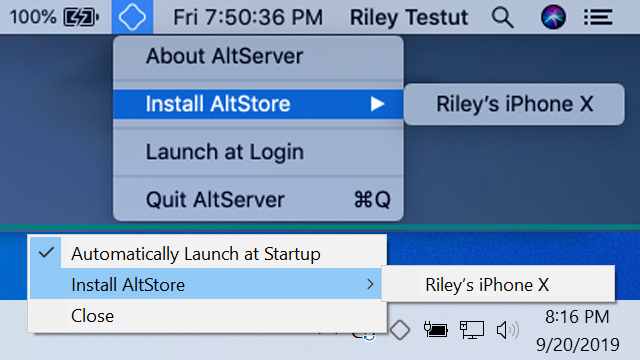
nc localhost 1337 # Terminal Window B AltStoreJust self-sign unc0ver 7.0 and enable unc0ver jailbreak after that!
![图片[6]-iOS14.3-14.5.1完美越狱教程,支持iPhoneXR/XS/XSMAX/11/PRO/PROMAX/12系列](https://cdn.6ziz.com/wp-content/uploads/2021/10/QQ截图20211026004425.jpg)
![图片[7]-iOS14.3-14.5.1完美越狱教程,支持iPhoneXR/XS/XSMAX/11/PRO/PROMAX/12系列](https://cdn.6ziz.com/wp-content/uploads/2021/10/QQ截图20211026004350.jpg)
![图片[8]-iOS14.3-14.5.1完美越狱教程,支持iPhoneXR/XS/XSMAX/11/PRO/PROMAX/12系列](https://cdn.6ziz.com/wp-content/uploads/2021/10/QQ截图20211026004259-205x450.jpg)



