How to Root a OnePlus Phone with MagiskNo TWRP required
关于如何在没有 TWRP 恢复的情况下 Root OnePlus 9系列手机的全部内容。在本文中,我们介绍了OnePlus 9 Pro 的解锁过程,提取启动映像文件,使用Magisk App 修补启动映像,最后通过ADB 接口刷入...
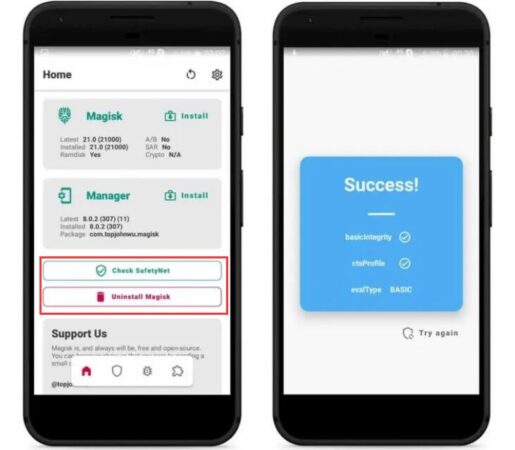
9. Root your device with a patched boot image
Preparation before rooting Installed the phone driver on the computer Installed the Magisk App on the device Downloaded and patched the boot image with the Magisk App Installed the SDK on the computer The device has unlocked the Bootloader Use the patched boot image to root your device 1.Root your device with the patched...
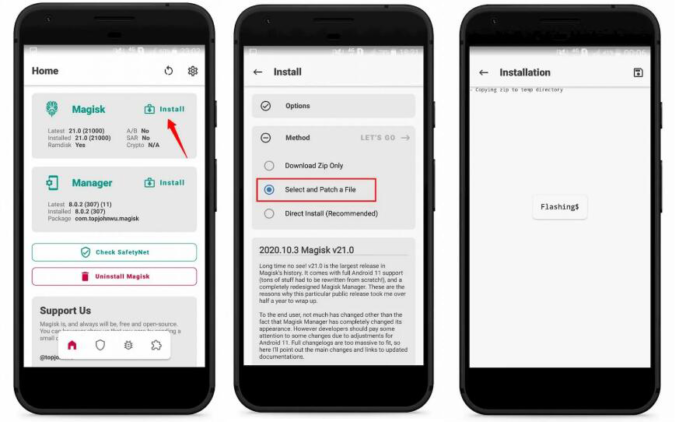
8. Android system firmware boot image Magisk modification
1.Download system firmware Can root various brands of Android devices system firmware brush package download, welcome to submit, the list is not complete. Xiaomi Firmware Official Download OPPO Firmware Official Download OnePlus Firmware Official Download realme Firmware Official Download ROGPhone Firmware Official Download Meizu Firmware Official ...
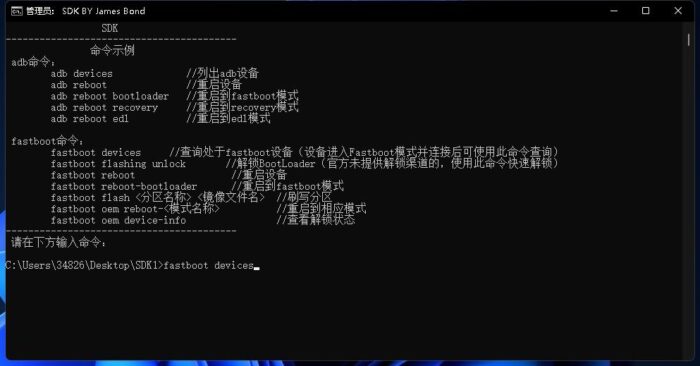
7. Unlock BootLoader Tutorial
Within the ADB program you can unlock most of the phones that do not provide official unlocking channels, this is only an example. In order to officially provide unlocking channel millet as an example, enter the official unlocking page according to the prompts can be operated, official tutorials, the following tutorials from the official millet, the official did not provide unlocking ...

6. Download Magisk Zip 30.0 (Magisk Manager) Latest Version 2025
Magisk Zip is a swipeable file for installing Magisk Root on Android phones . It is possible to install/flush this Magisk Zip 23.0 latest version using custom recovery ( TWRP ). We recommend you to use TWRP Recovery to install Magisk.

5. Download Magisk App v30.0(Magisk Manager) Latest Version 2025
Magisk App helps us to manage Root inside the app.You can use this app to allow or deny root privileges to any Android app. With Magisk App you will find many useful Magisk modules that you can use directly from the app...

Root Disclaimer and Risk Warning
Root Disclaimer and Risk Warning Before you Root your device, please be sure to read the terms and conditions of this disclaimer carefully. Through this disclaimer, the user to use the Root function may contain risks and the impact on the user's system to prompt, if the user chooses to accept and continue to use R...
4. Features of Magisk
Magisk is so feature-rich and has so much to boast about to the extreme that we can't summarize every single feature because of its comprehensive list. However, we have tried to provide all the important factors that make Magisk so different from other software. Free and Open Source In a typical scenario, Roo...
3. What is Magisk App (Magisk Manager)?
What is the Magisk App (Magisk Manager)? To be clear, its a root permissions manager developed as a component of the Magisk Zip download. It allows you to grant a large number of excellent Magisk modules, or as some of you call them...
2. What is Magisk?
Magisk is an excellent Root tool to Root Android devices and it is the most secure solution in the market. No one in the Android root industry has ever changed or modified the system partition of a device during rooting except Magisk. It will be in the boot partition...
1.What does ROOT mean and what does it do?
What does rooting mean? The user's right to manage the phone's system files and the process of changing them according to the user's wishes is usually restricted by the manufacturer. In simple terms, Root access can be described as opening a new door to extended functionality and giving the user administrator level access. root...

