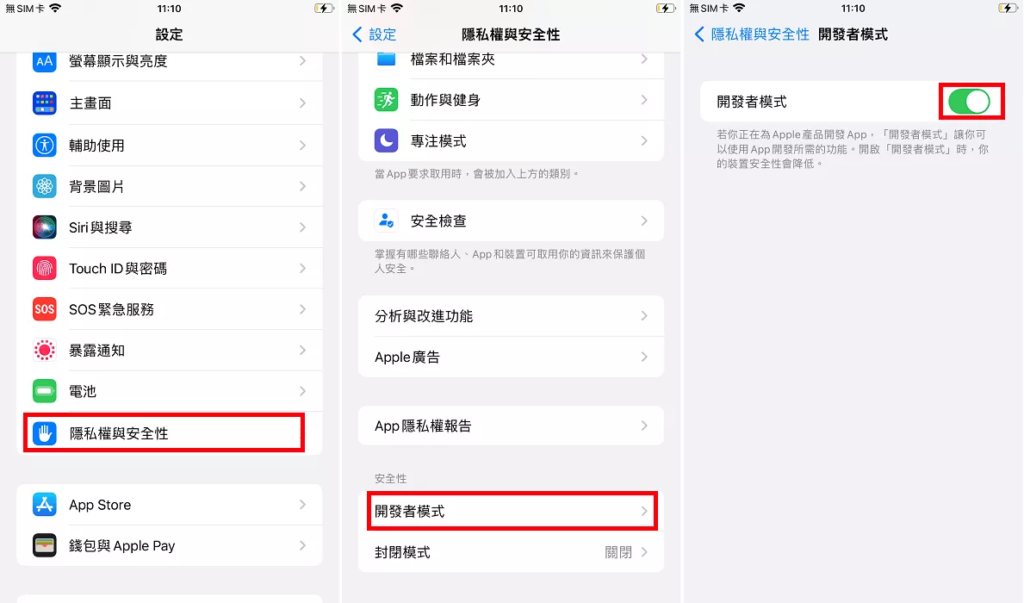
If you are using iOS version 16+, then you can turn on the Developer Mode feature in the iPhone Settings by following the step-by-step guide below.
This tutorial may only work on devices that have installed third-party apps from outside the AppStore.
Step 1. Go to iPhone Settings > Privacy & Security.
Step 2. Scroll down to the very bottom and in Security tap on 'Developer Mode' and enable it.
Step 3.At this point you will be prompted that you need to restart your iPhone, click 'Restart'.
Step 4. Wait for iPhone to finish rebooting, iPhone will ask if you want to enable Developer Mode again, click "Enable" and enter your passcode to confirm enabling Developer Mode.